Hold tight - Something is brewing...
Boating, storm and cyclone alerts: let the forecast come to you
Author: Dominic Fichera
Posted on: Friday, November 13th, 2026, 12:15:51 AM
G'day everyone,
The forecast changes every time a new model run comes in. A Saturday that looked perfect for the boat can turn rough overnight, a quiet week can suddenly line up storms, and a tropical low can start drifting your way. Our weather alerts keep an eye on all of that for you, and tell you by email or push notification the moment something you care about changes.
This post covers the three alerts our northern readers ask about most: boating, storms and cyclones. I'll explain what each one watches, give you a few real-world ways to use them, and show you how to set them up, pause them and tidy them away when you're done.
Weather alerts are part of your Eyewall Lite and Eyewall Pro subscription, at no extra cost.
All the screenshots in this post use sample data, so don't read anything into the forecasts in them.
🌶️ The secret sauce
Anyone can download the raw computer model data. What turns it into something you can actually plan around is knowing which ingredients matter, and how much to trust them. That's where Nitso comes in.
Nitso has spent years forecasting the tropics, and he's built up a reputation for getting it right. Every alert mentioned in this post runs on his rules: his limits for when a boat should stay on the trailer, his recipe for when storms (and the nasty ones) are really on the cards, and his way of reading the cyclone tracks. This means you can focus more on what matters to you, instead of second-guessing every forecast or wondering if this is just another forecasting services trying to drum up "clicks".
Nitso and his recipe is the reason so many of you choose WeatherIQ, and it's all included in your Eyewall Lite or Pro subscription.
🧠 How the alerts work
Every alert is built on ECMWF, the European weather model Nitso uses every day. Each run, ECMWF doesn't make just one forecast, it makes 51 slightly different ones. When most of them agree, you can be confident. When they're split, the weather is still up in the air. Our alerts count how many of those forecasts agree and tell you when that changes.
- You hear about changes, not the same news twice. An alert only messages you when a day changes: when it becomes likely, or when it stops being likely. If Saturday was already a good boating day yesterday and it still is today, you won't get another message about it.
- Setting up an alert sends nothing straight away. The first check just takes note of where things stand. You'll hear from it the next time the forecast changes. The same goes for a new day coming into range at the end of the week.
- No pinging back and forth. Once a day has turned on, it has to drop well below your line (15 percentage points) before it turns off again. A forecast wobbling between 59% and 61% won't send you anything.
- Checked after every model run. We check your alerts as soon as each new ECMWF run is ready. Cyclone alerts are also checked after every run of ECMWF's newer AI model (AIFS), so up to four times a day.
- One message per check. If several of your alerts change in the same run, they all come together in one email and one push notification, not a flood of them.
- You choose how you hear. Each alert can email you, send a push notification, or both.
You can have up to 20 alerts, watching up to 5 different towns.
🚤 Boating alerts
What it's for
Our Boating and fishing outlook gives every day of the next ten a Go, Caution or No-go call for your size of boat, at spots right along the Queensland, Northern Territory and Western Australian coasts. A boating alert watches those calls for you, and tells you when a day becomes a Go day, or stops being one.
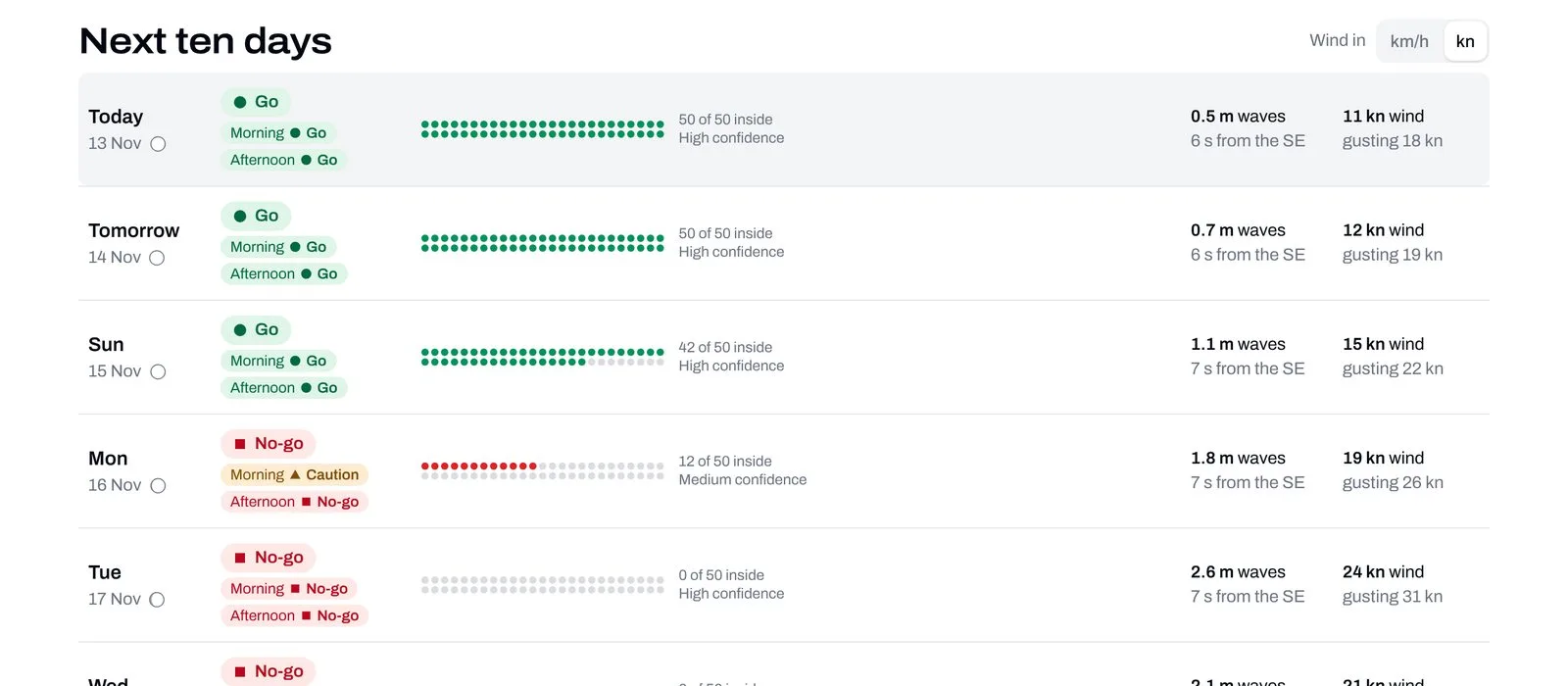
The boating outlook judges every day for your boat. Sample data.
What counts as a Go day
A day is a Go day for your boat when most of the forecasts keep the waves, wind and gusts inside sensible limits for its size all through daylight. Nitso has set those limits separately for a tinny, a 5 to 7 m runabout and a boat of 8 m and over, so a day that's too rough for a tinny can still be a Go for a bigger boat.
Your alert uses exactly the same call as the outlook page, so it will never disagree with what you see there.
Ways to use it
- The weekend fisho. You fish out of Townsville in a runabout whenever the weather lets you. Set an alert for any day this week that becomes or stops being a Go day. You'll hear when Saturday opens up, and just as importantly, you'll hear if it closes again after you've rung your mates.
- The well-timed sickie. Some of you have told us you use boating alerts to spot a glassy Wednesday a few days out. We couldn't possibly comment. But if the boss asks, you were feeling a bit under the weather, and technically that's true.
- The planned trip. You've got two days off and want to take the tinny out of Darwin. Choose the days I choose, pick those two dates, and ask to hear when they become a Go day. Each date drops off once it's passed, and the alert switches itself off after the last one. It beats checking the forecast forty times a night.
- The bigger boat. If you run an 8 m boat out to the reef, set the alert for that size. A day that's a No-go for a tinny can be a perfectly good day for you.
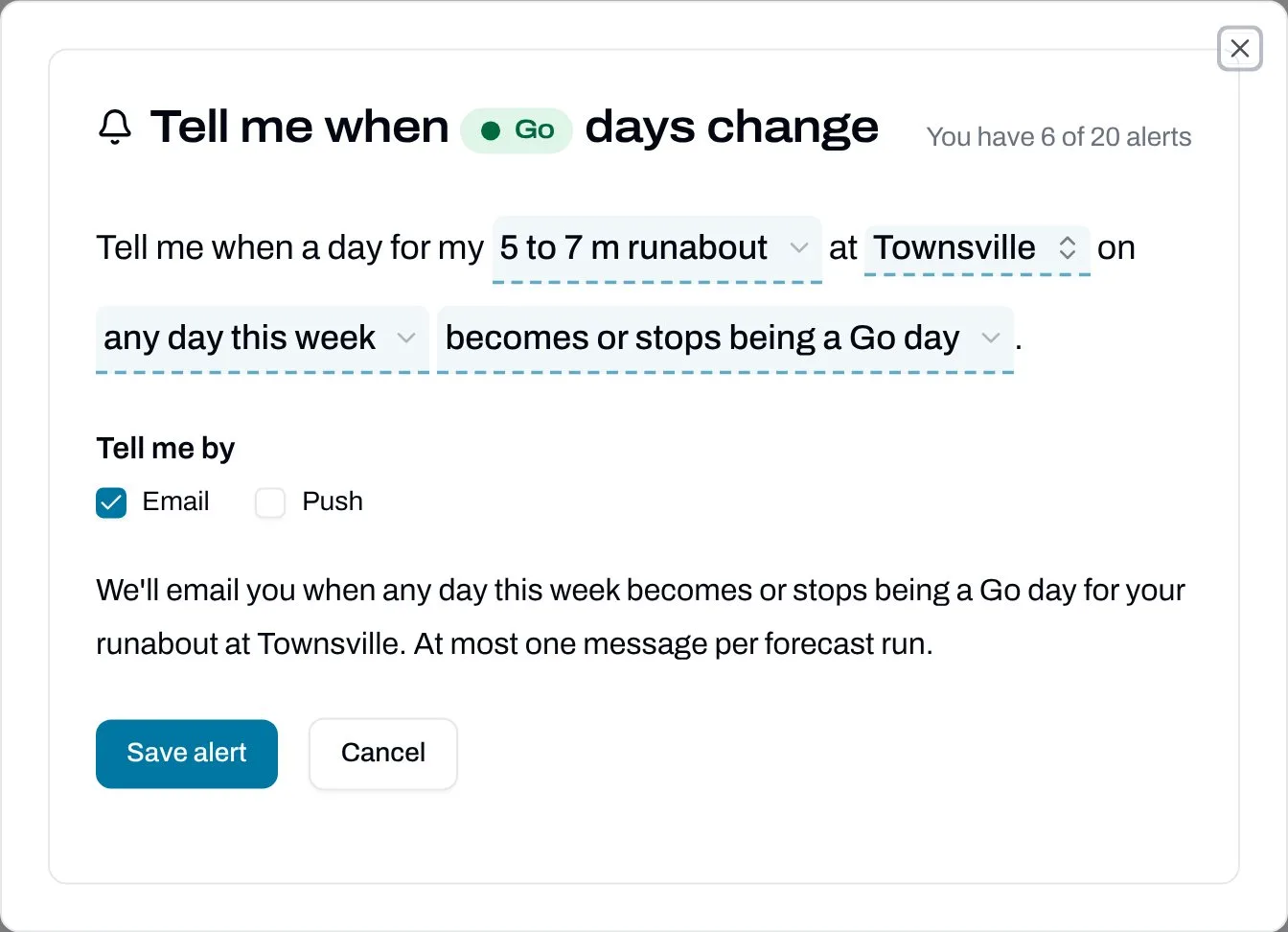
Setting a boating alert reads like a sentence. Tap any underlined part to change it.
Please remember, a Go day is a guide from the forecast models, not a guarantee. The forecast uses 25 km squares of ocean, so it's best for open water and the outer reef. Always check the Bureau of Meteorology's marine warnings before you head out, and you're always the one responsible for your boat and crew.
⛈️ Storm alerts
What it's for
Storm season is here, and our Storm map shows where storm ingredients are lining up over the next ten days. A storm alert watches your town and tells you when storms become likely there on a day this week, during the day or overnight, or when they stop being likely.
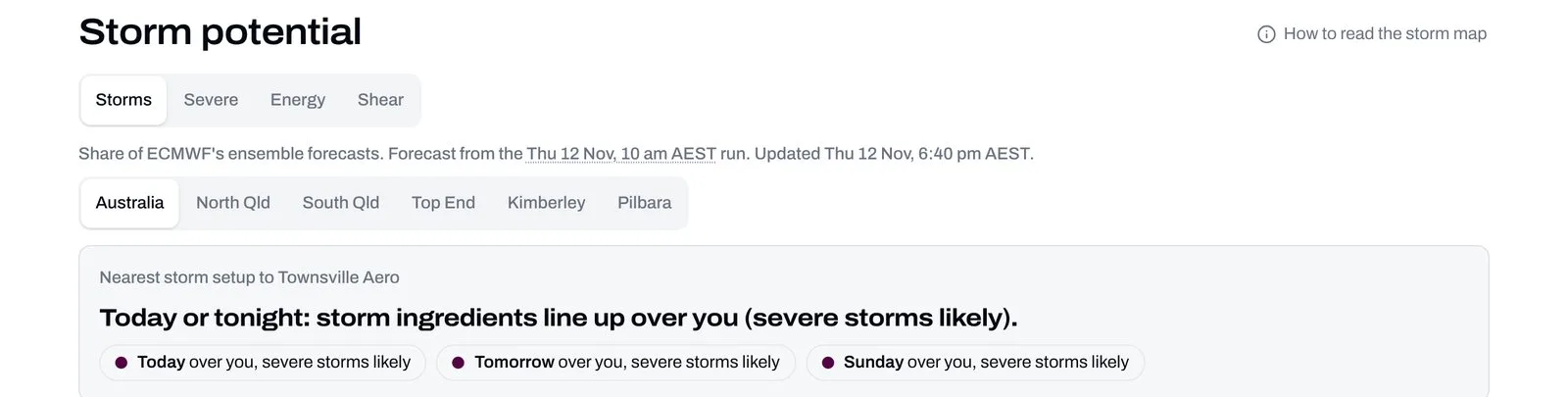
The Storm map tells you what's lining up over your place. Sample data.
What it watches
You pick one of two things to watch:
- Storms. The forecasts show all the ingredients a thunderstorm needs coming together over your place: enough energy, unstable air, moisture and rain.
- Severe storms. All of that, plus the extra ingredients behind the nasty ones, the storms that bring large hail and damaging winds.
These are Nitso's own storm rules, the same ones behind the Storm map, refined over many seasons of forecasting storms in the north. You don't need to know the science to use the alert. Pick storms or severe storms and we'll do the rest.
How sure should the forecast be?
For storm alerts you also choose how many forecasts need to agree before we tell you:
- Early heads-up (30% of forecasts agree). Hear about it days early, while it's still only a possibility. Some won't happen.
- Fairly sure (60%). A good balance for most people, and the default.
- Very sure (80%). Only when the forecasts strongly agree. You'll hear later and less often, but rarely for nothing.
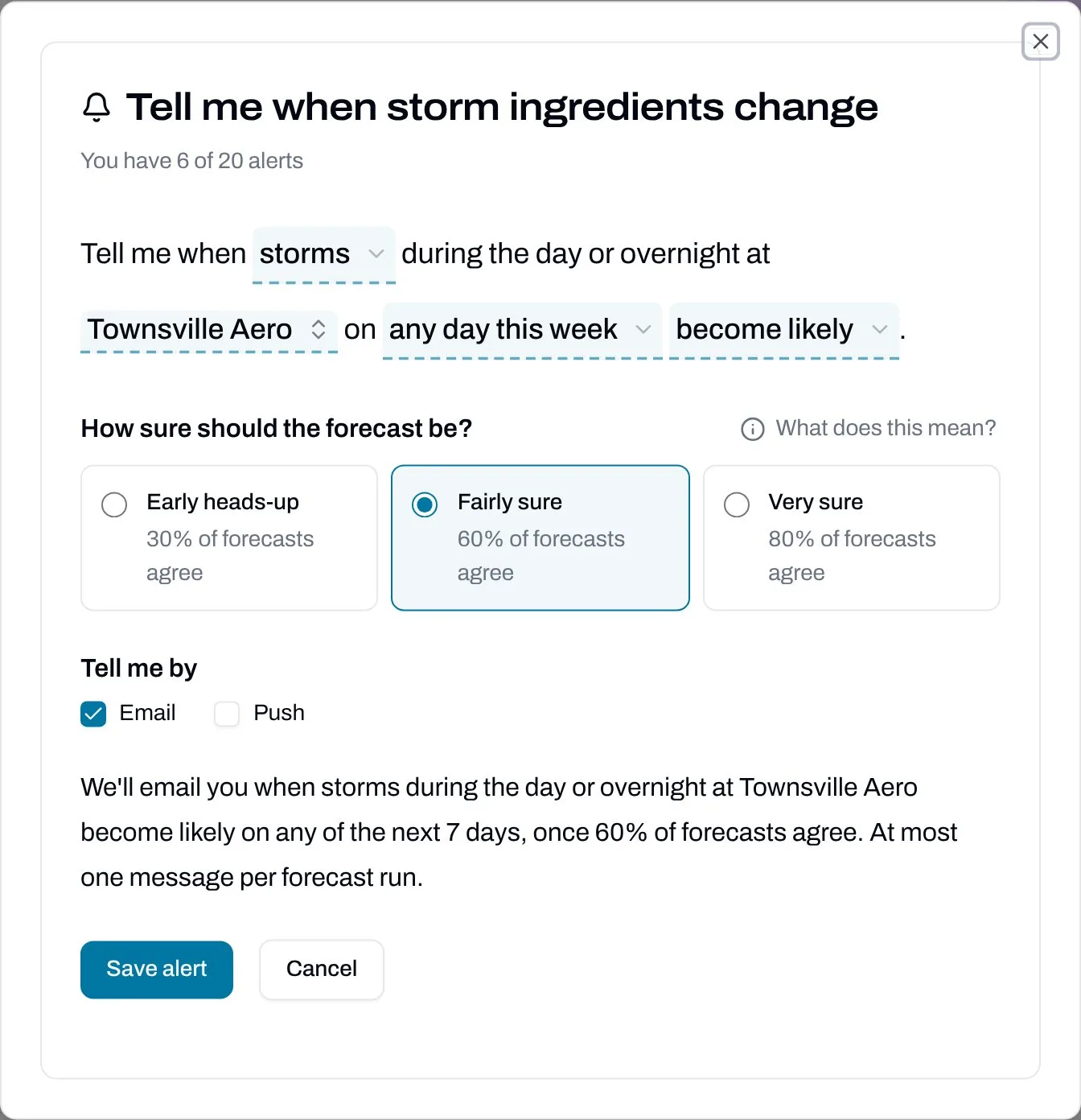
Choose storms or severe storms, and how sure the forecast should be.
Ways to use it
- On the land. If a severe storm means moving stock, getting hay under cover or holding off on a job, set a severe storms alert at Fairly sure. You'll get a few days' notice once the forecasts start agreeing.
- The storm watcher. If you love a good storm, set a storms alert at Early heads-up for the town you chase from, and ask to hear when storms become or stop being likely. You'll know early when a setup is brewing, and when it falls apart. Your family will finally know why you keep wandering outside to stare at the western sky.
- Keeping an eye on family. Set an alert for where your parents or kids live. It doesn't have to be your own town.
A storm alert tells you the ingredients are there, not that a storm will definitely hit your house. For warnings about storms that are happening, always follow the Bureau of Meteorology.
🌀 Cyclone alerts
What it's for
Cyclone watch shows the tracks the forecast models give any tropical low or cyclone near Australia, and the chance it passes near your town. A cyclone alert watches that chance for you over the next 7 days, and tells you when it rises past the line you choose.
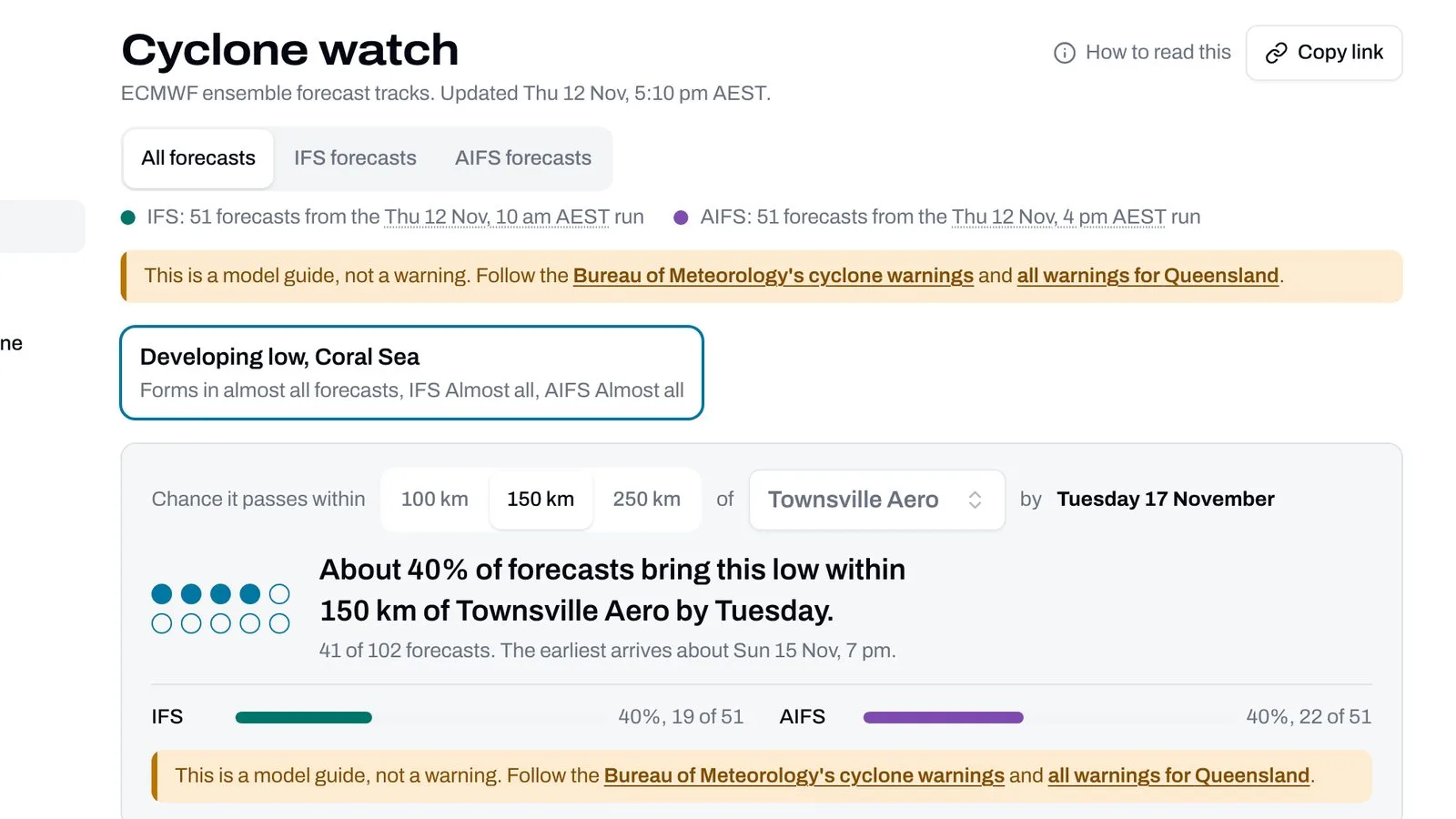
Cyclone watch counts how many forecasts bring a system near your town. Sample data.
What it watches
You choose a town, a distance (100, 150 or 250 km) and a chance (10%, 20%, 30% or 50% of forecasts). The alert turns on when at least that share of forecasts bring any tropical cyclone or low within that distance of your town at some time in the next 7 days.
Cyclone alerts count all forecasts: the newest run of ECMWF's standard model (IFS) together with the newest run of its AI model (AIFS), 102 forecasts in all, just like Cyclone watch shows when it opens. Because of that, they're checked after every run of either model.
Every cyclone alert also links to the Bureau of Meteorology's cyclone warnings. Our alert is an early heads-up from the models, never a warning. When the Bureau issues a warning, follow the Bureau.
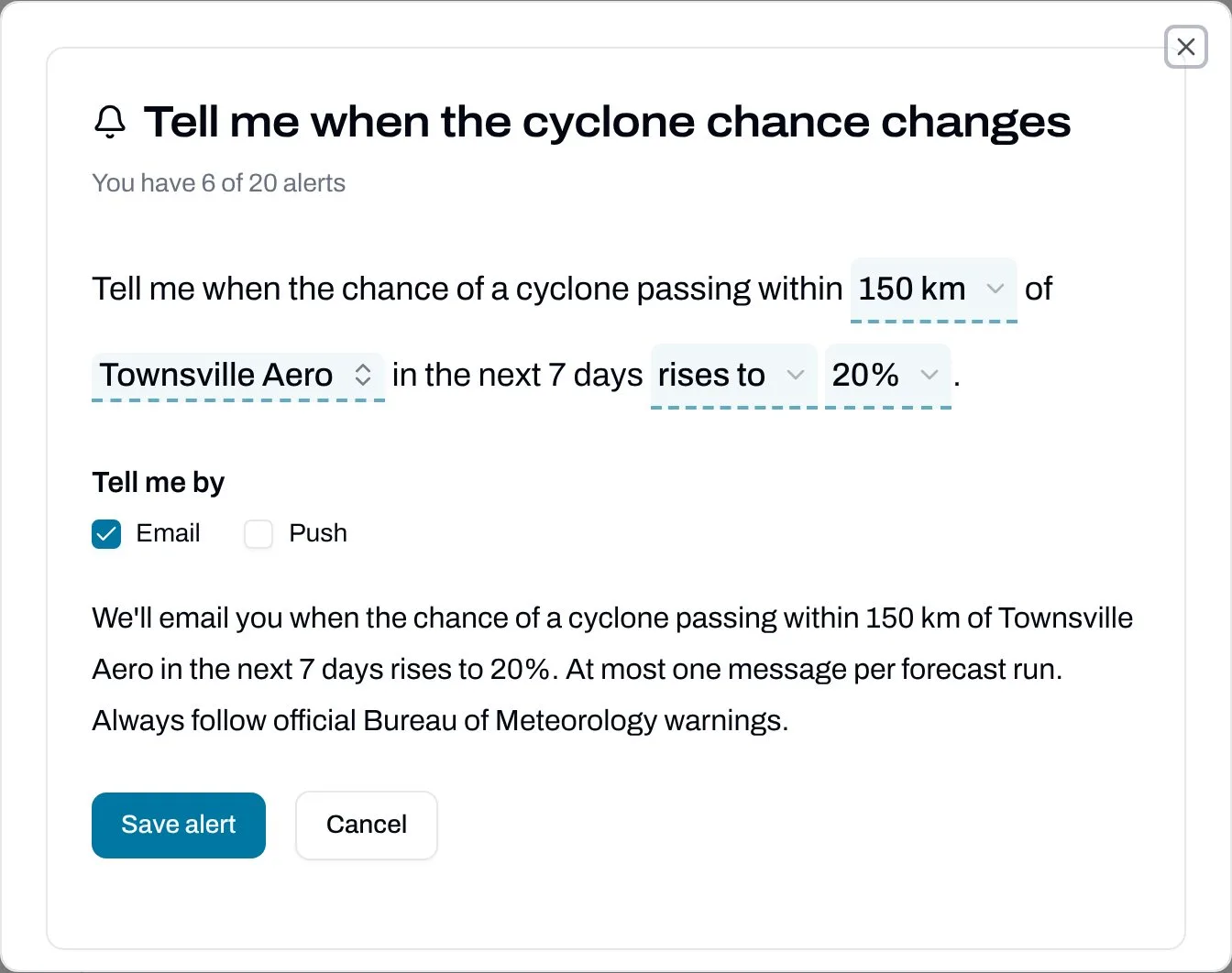
Pick your distance, your town and the chance that matters to you.
Ways to use it
- Time to prepare. Most people in cyclone country are well served by 150 km and 20%. That's early enough to check your cyclone kit, clean up the yard and fill the car, without being told about every distant low.
- Remote and long lead times. If you run a station, a work crew or anything that takes days to organise, try 250 km at 10%. You'll hear about systems while they're still a long way off.
- Only the serious ones. If you only want to hear when it's getting real, use 100 km and 50%.
- Know when it's eased. Choose rises to or falls back below and you'll also hear when the chance drops away again, so you know when you can relax.
➕ Setting up an alert
There are two ways in:
- From the tool itself. On the Boating and fishing outlook, the Storm map or Cyclone watch, tap Tell me when it changes. The alert starts filled in with what you're looking at: your spot and boat, your storm view, or your town and distance.
- From your account. Go to Account, then Alerts, and tap Add an alert. You can set up any type of alert from there.
Then:
- Read the sentence at the top and tap any underlined part to change it: the place, the days, and whether you want to hear when something becomes likely, stops being likely, or both. Near me follows your My Weather location.
- For storm alerts, choose how sure the forecast should be.
- Under Tell me by, tick Email, Push, or both.
- Check the sentence underneath, which says exactly what you'll hear about, and tap Save alert.
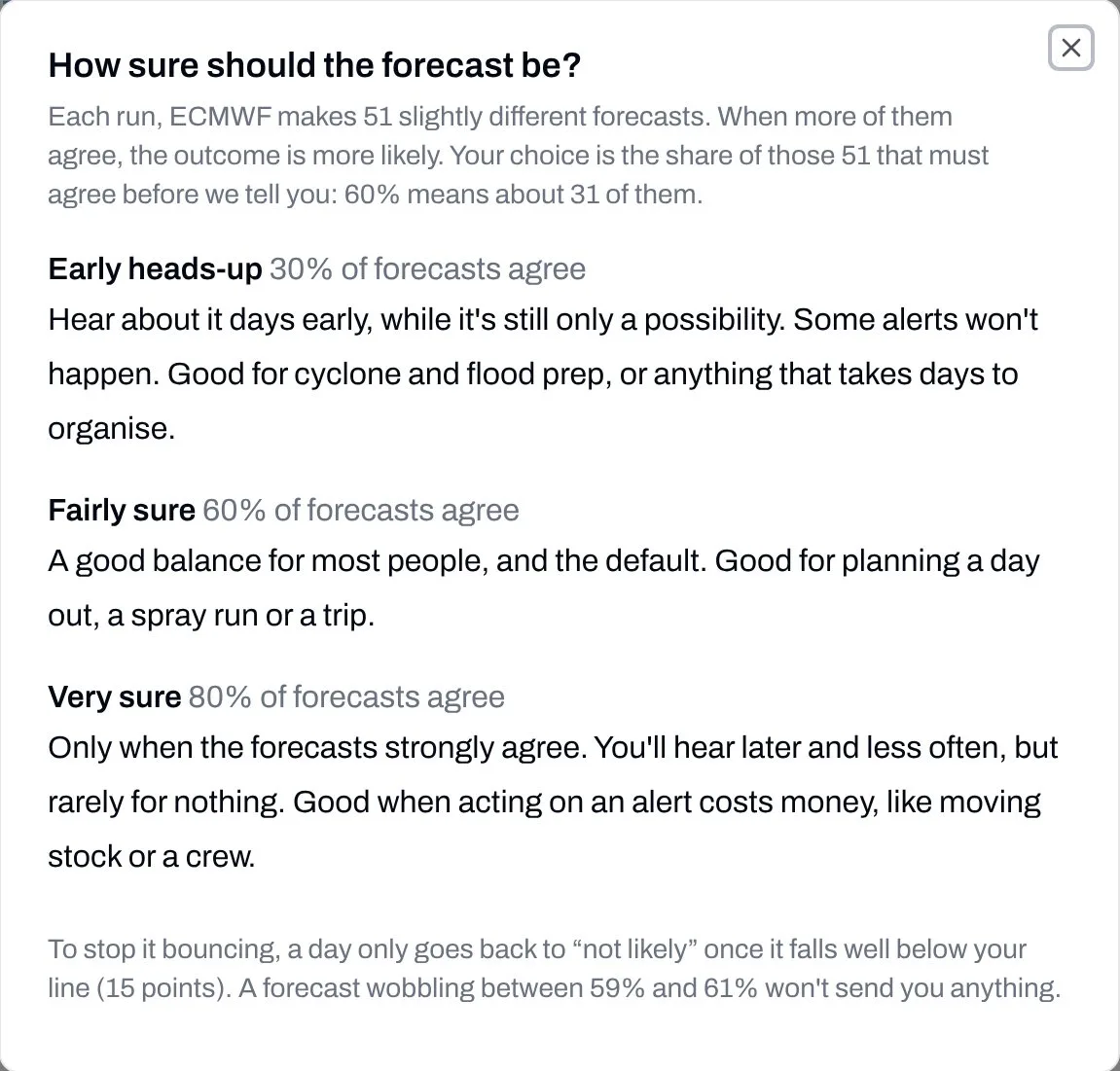
Not sure which to pick? Tap "What does this mean?" in any alert.
Push notifications need to be turned on for each phone, tablet or computer you want them on. Go to Account, then Alerts, and switch them on under Push on this browser. On an iPhone or iPad, add WeatherIQ to your Home Screen first (see our Home Screen post), because Apple only lets websites send notifications from there.
📬 What an alert looks like
When something changes, you'll get one email (and one push notification, if you've turned those on) listing every change from that model run. Each one tells you the day, the place, what changed, and how many forecasts agree now compared with before.
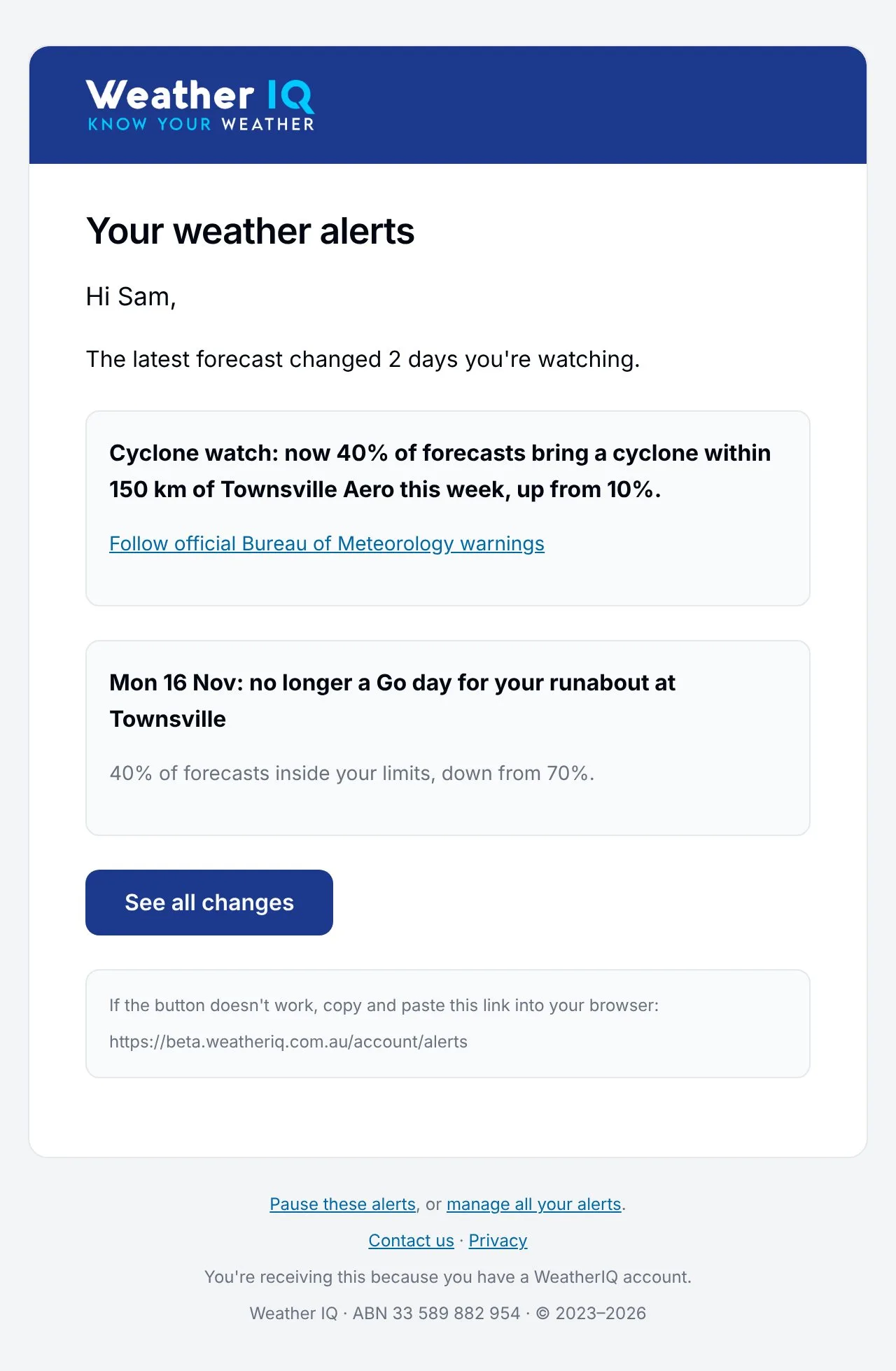
An alert email. The cyclone change always links to the Bureau's warnings. Sample data.
🗂️ Managing your alerts
Everything lives in Account, then Alerts:
- Latest changes lists every change your alerts have sent you in the last 7 days, newest first. Handy if you missed a notification.
- My alerts lists every alert you've set, what it watches, how sure it needs to be and how it tells you.
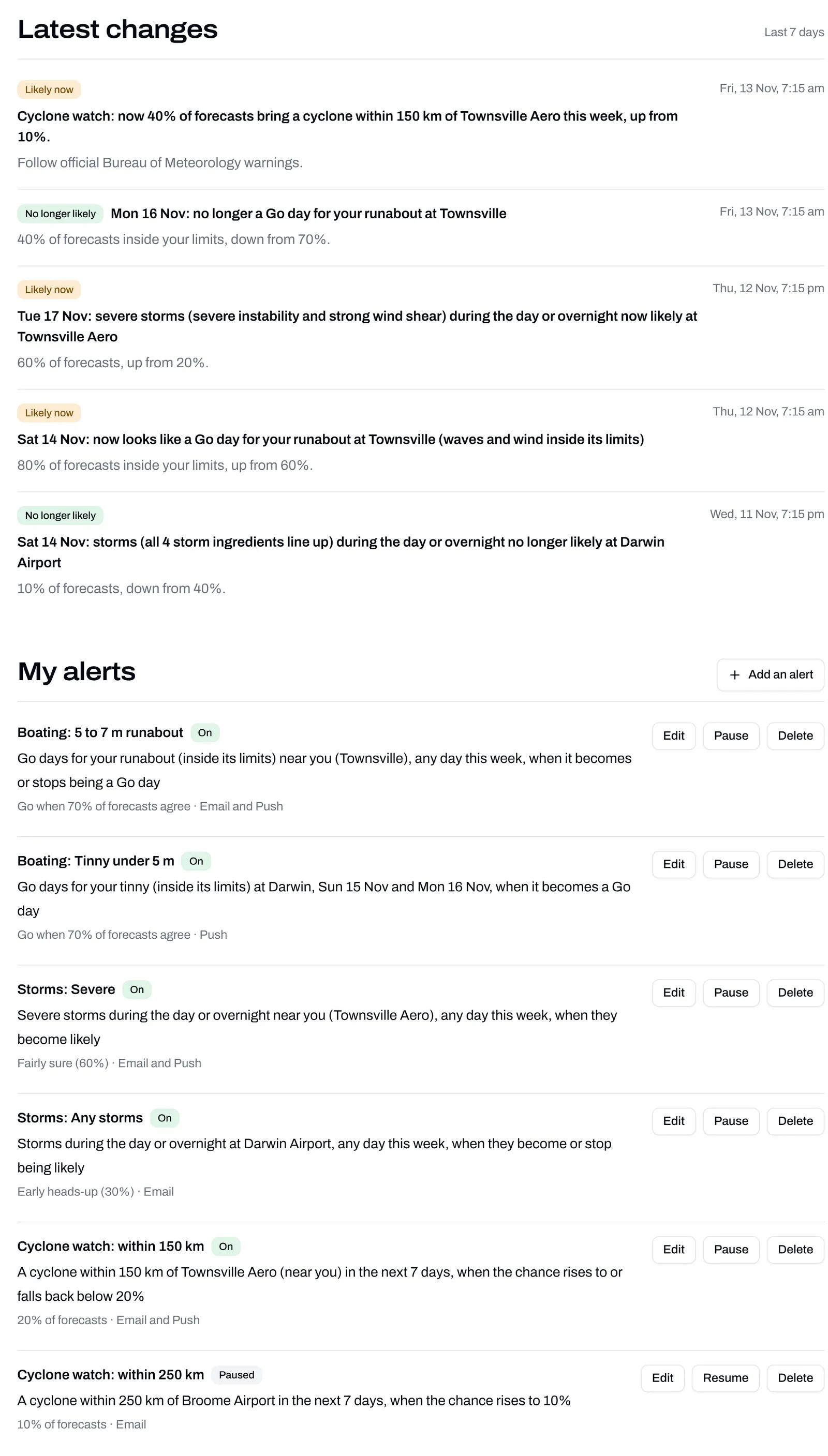
Account, then Alerts: your latest changes and all your alerts in one place. Sample data.
Next to each alert:
- Edit opens the alert so you can change anything about it: the place, the days, the boat, the distance or how you're told.
- Pause stops it messaging you without losing your settings. It stays in your list marked Paused. Tap Resume whenever you want it back. Great for when you're away, the boat's on the trailer for repairs (again), or cyclone season has finished.
- Delete removes it for good. We'll ask you to confirm first, and it stops straight away.
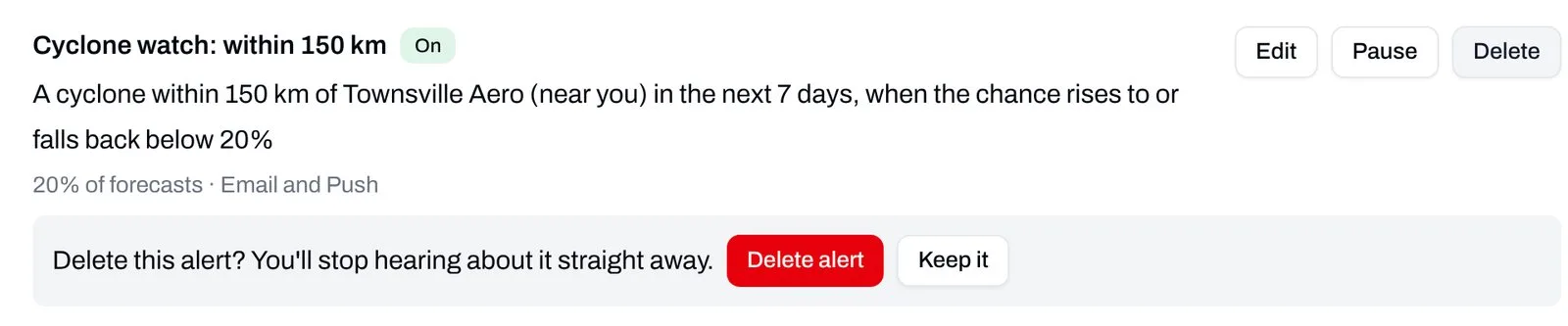
Delete asks once before it removes an alert.
You'll also find your alerts on each tool's own page, under Your boating alerts, Your storm alerts and Your cyclone alerts, with the same Edit, Pause and Delete buttons.
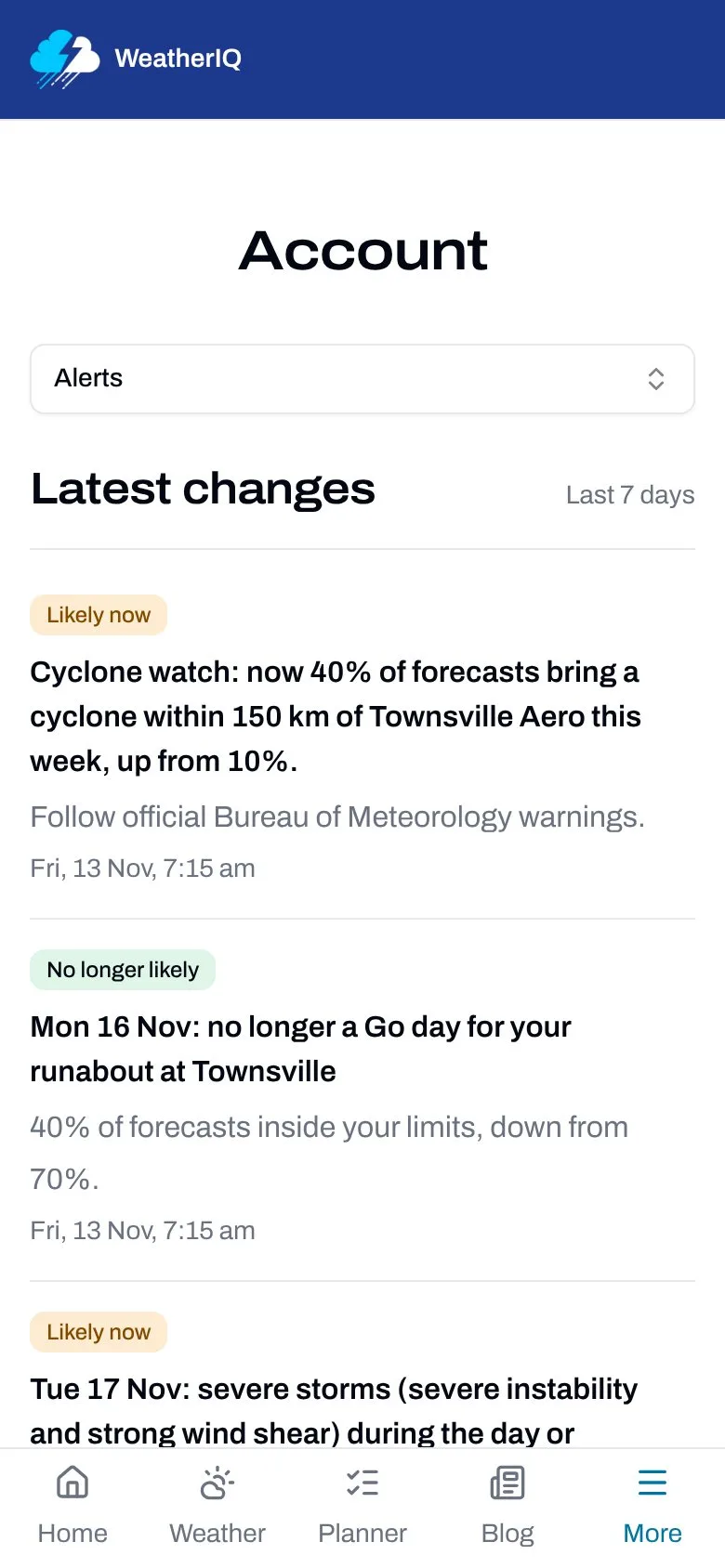
It all works on your phone too.
Getting too many emails? Every alert email has a Pause these alerts link at the bottom. One tap pauses the alerts in that email, and only those. You can resume them from your Alerts page whenever you like.
💡 Tips for useful alerts
- Start with one or two. Set up the alerts you'd actually act on. You can always add more later. Twenty alerts going off at once is a lot of excitement for a Tuesday.
- Match how sure to what it costs you. If acting on an alert is cheap (checking your gear), go early. If it's expensive (cancelling a charter or moving a crew), wait until the forecasts agree.
- Ask to hear both ways for plans you've already made. "Becomes or stops being" means you hear when a good day turns bad, which is often the message you need most.
- Use chosen dates for trips. They tidy themselves up afterwards.
- Pause rather than delete anything you'll want again next season.
Know someone who lives by the weather? A mate with a boat, a farmer down the road or a storm-chasing cousin? Send them this post - They can even read it without an account to learn more about what we offer at WeatherIQ.
🙏 Tell us how you go
If you've got an idea for another alert, or something doesn't work the way you expect, let us know through our Contact Us form or by emailing us at support@weatheriq.com.au.
Thanks for being part of WeatherIQ!
Dominic